




 Bay Alarm Medical Buyer's Guide
Find the right Medical Alert System for your Lifestyle
Compare where each system works, which features you need and what you can expect to pay.

Updated August 2026

Reviewed by Medical Alert Specialists

8 Minute Read

Introduction
A clear path to the right medical alert system
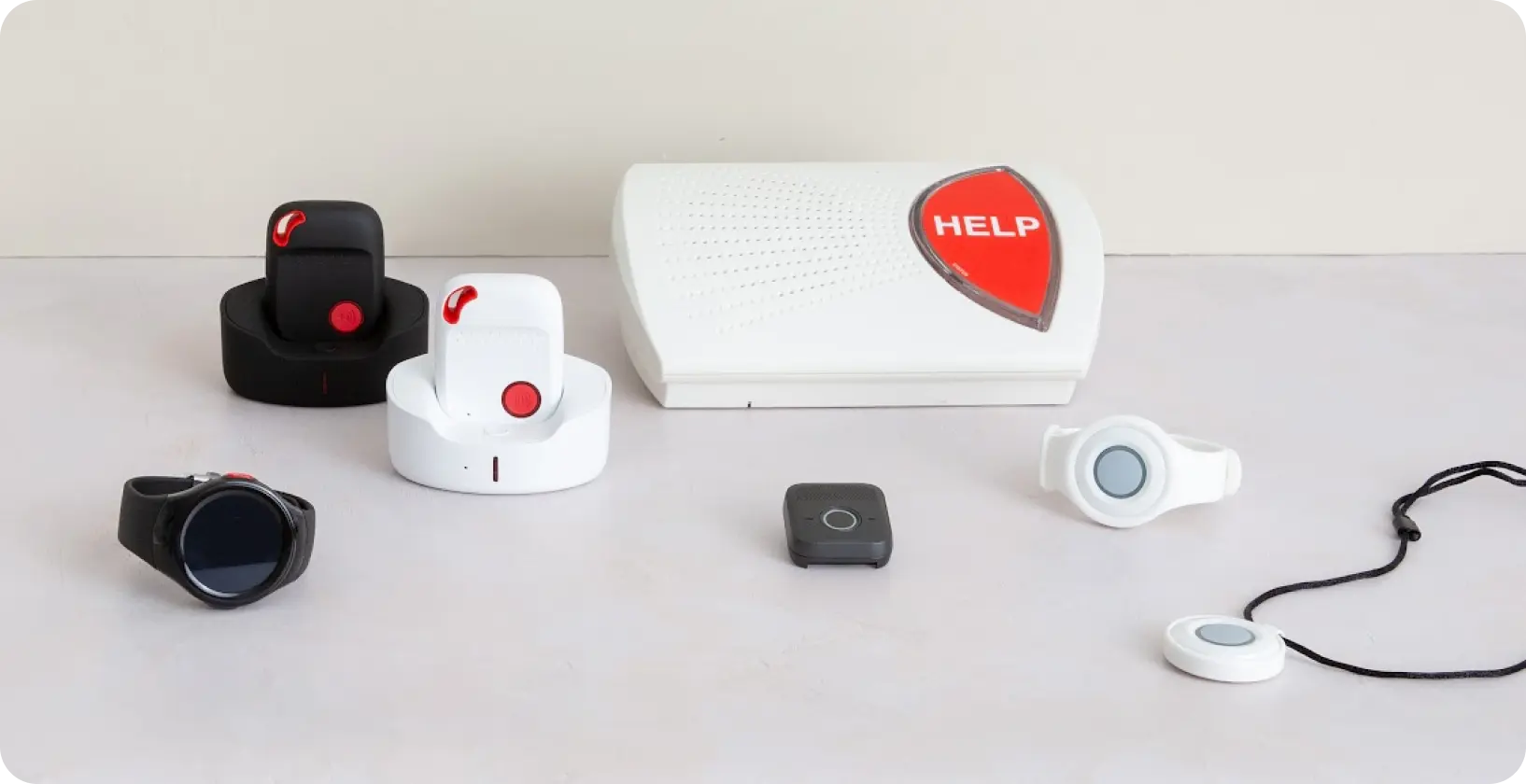
Compare coverage, features, and pricing with confidence. This guide helps you choose a system that fits the user’s routine, comfort, and independence – not just a long list.
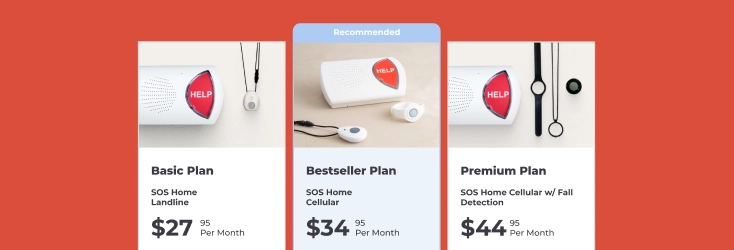
Quickly find the right medical alert system from these 3 options:


Step 1
Start with everyday life, not product specifications

The best medical alert system is not necessarily the one with the longest feature list. It is the one that fits the user’s routine well enough that they will keep it close, keep it charged when necessary, and feel comfortable using it.
Start by thinking about an ordinary week. Does the person spend most of the day at home? Do they walk around the neighborhood, visit friends, drive, shop, or travel? Would they prefer a traditional help button, a smaller mobile device, or something that looks more like an everyday watch?
These questions quickly narrow the options. Someone who is almost always at home may not need the same device as someone who regularly runs errands or takes long walks. A person who dislikes traditional pendants may be more willing to wear a discreet device or smartwatch. The right system should work with someone’s independence-not ask them to give it up.

Scenario 1
I spend most of my time at home
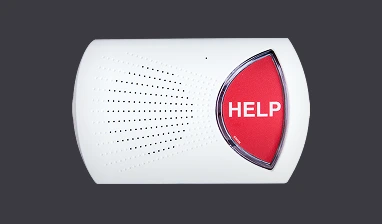
An in-home medical alert system may be the simplest and most affordable fit. A base station connects the user to the monitoring center, while a wearable help button provides coverage around the home and yard within the system’s range.
Consider: SOS Home

Scenario 2
I want protection at home and while I’m out
An in-home medical alert system may be the simplest and most affordable fit. A base station connects the user to the monitoring center, while a wearable help button provides coverage around the home and yard within the system’s range.
Consider: SOS All-In-One 2 or SOS Micro

Scenario 3
I’m concerned about falls
Automatic fall detection adds another layer of protection if someone falls and cannot press the help button. When a fall is detected, the device can automatically connect to the monitoring center so an operator can assess the situation and send help if needed.
Consider: SOS All-In-One 2 or SOS Micro or SOS Smartwatch
Still Not Sure What's Right for you?
Speak with a medical alert specialist who can answer your questions, compare systems and help you choose the right protection for your needs.
 Call 1-877-522-9633
Step 2
Choose the features you will actually use

Medical alert features are meant to solve specific problems. Automatic fall detection can provide another layer of protection when a user may be unable to press a button. GPS is valuable when emergencies could happen away from home. Caregiver tracking can help families stay informed without calling throughout the day.
The goal is not to add every available feature. It is to identify the situations that cause the most concern and choose the features that address them directly.

Automatic fall detection
In many emergencies, pressing the help button is the fastest way to request assistance. But a serious fall can leave someone disoriented, unconscious, or physically unable to press it. Automatic fall detection is designed to recognize movement that may indicate a fall and contact the monitoring center on the user’s behalf.
Learn More
GPS location
An in-home system knows the address where its base station is installed. A mobile system needs to help the monitoring center determine where the user is at the time of an emergency. GPS location makes that possible when the person is walking, shopping, driving, traveling, or anywhere else with compatible cellular coverage.
Learn More
Caregiver tracking
Caregiver tracking lets authorized family members check information such as a mobile device’s location, location history, or battery status. This can reduce the need for repeated “Are you okay?” calls while still helping family members stay aware of potential concerns.
Learn More
Cellular or landline connection
Traditional in-home systems may connect through a landline, while cellular systems include their own cellular connection. A cellular option does not require the user to own a mobile phone, and it can simplify installation in homes without compatible landline service.
Learn More
Battery life and charging
Charging is easy to overlook during the buying process, but it becomes part of the user’s daily or weekly routine. Think honestly about whether the person will remember to charge the device and whether there will be times when it is left on the charger instead of being worn.
Learn More
Comfort and wearing style
A medical alert device only helps when it is available. Consider the device’s size, weight, button placement, and whether it can be worn in the way the user prefers. Some people like a pendant, some prefer a wrist button, and others are more comfortable with a smartwatch or small mobile device.
Learn MoreDecision Making Chart
| If this is your main concern... | Prioritize... |
|---|---|
| A fall when no one is nearby | Automatic fall detection |
| Emergencies during errands or walks | Mobile coverage and GPS |
| A loved one becoming lost or disoriented | GPS and caregiver tracking |
| Remembering to charge the device | A realistic charging routine and battery alerts |
| Resistance to wearing a traditional pendant | A discreet mobile device or smartwatch |
| No landline in the home | Cellular connection |
Step 3
Understand what happens after the button is pressed

Knowing what happens during an alert can make the system feel less intimidating. Professional monitoring does not mean an ambulance is automatically sent every time the button is activated. It means the user is connected with a trained professional who can understand the situation and contact the appropriate help.
Press the button
The user presses the button on their wearable, mobile device, smartwatch, or base station. Select systems may also initiate an alert when automatic fall detection identifies a possible fall.
Speak with the monitoring center
A trained monitoring professional speaks with the user through the system. If the activation was accidental, the user can simply say that they are okay.
Get the right help
The monitoring professional contacts the appropriate people based on the situation and the user’s account instructions. That may be a family member, a neighbor, or emergency services.
Step 4
Compare Bay Alarm Medical systems

Once the reader understands where coverage is needed and which features matter, the product comparison becomes much easier. Lead with who each system is for rather than technical specifications.

Help primarily at home
SOS Home
Provides reliable coverage throughout the home and nearby areas. An affordable starting point with 24/7 professional monitoring.
- 24/7 professional monitoring
- Lightweight wearable help button
- Optional automatic fall detection

Best for active users wanting something compact
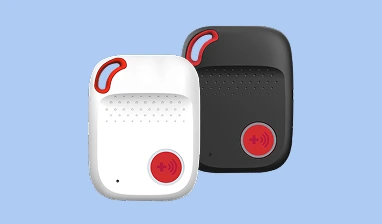
SOS Micro
A smaller mobile option for people who want protection without carrying a larger device.
- Compact and lightweight design
- GPS location services
- Long battery life for extended outings

Best for broad protection at home and away
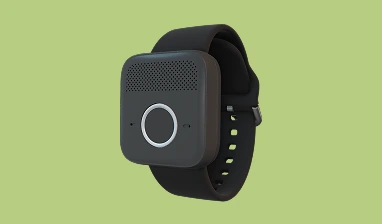
SOS All-In-One 2
A portable device with built-in speaker and GPS that goes wherever the user goes.
- Built-in GPS location tracking
- Two-way voice communication
- Nationwide cellular coverage

Best for someone preferring a familiar watch
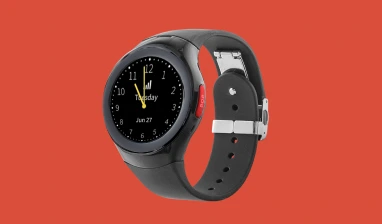
SOS Smartwatch
Combines medical alert functionality with a device that looks and feels like a regular wristwatch.
- Familiar wristwatch form factor
- Built-in GPS and cellular
- Health monitoring features
Medical Alert Comparison Chart
Swipe to compare Systems
| Feature |
 SOS Home
|
 SOS All-In-One 2
|
 SOS Micro
|
 SOS Smartwatch
|
|---|---|---|---|---|
| Best for | Someone primarily at home | Broad protection at home and away | Active users wanting something compact | Someone preferring a familiar watch |
| Help at home | – | – | ||
| Help away from home | – | |||
| Automatic fall detection | ||||
| GPS location | – | |||
| Extended battery life | – | |||
| Water resistance | ||||
| Starting at | $27.95/mo. | $34.95/mo. | $34.95/mo. | $39.95/mo. |
| Feature |
SOS Home
|
|---|---|
| Best for | Someone primarily at home |
| Help at home | |
| Help away from home | – |
| Automatic fall detection | |
| GPS location | – |
| Extended battery life | |
| Water resistance | |
| Starting at | $27.95/mo. |
*Verify current pricing and plan details before publication.
| Feature |
SOS All-In-One 2
|
|---|---|
| Best for | Broad protection at home and away |
| Help at home | |
| Help away from home | |
| Automatic fall detection | |
| GPS location | |
| Extended battery life | |
| Water resistance | |
| Starting at | $34.95/mo. |
*Verify current pricing and plan details before publication.
| Feature |
SOS Micro
|
|---|---|
| Best for | Active users wanting something compact |
| Help at home | – |
| Help away from home | |
| Automatic fall detection | |
| GPS location | |
| Extended battery life | |
| Water resistance | |
| Starting at | $34.95/mo. |
*Verify current pricing and plan details before publication.
| Feature |
SOS Smartwatch
|
|---|---|
| Best for | Someone preferring a familiar watch |
| Help at home | – |
| Help away from home | |
| Automatic fall detection | |
| GPS location | |
| Extended battery life | – |
| Water resistance | |
| Starting at | $39.95/mo. |
*Verify current pricing and plan details before publication.
*Verify current pricing and plan details before publication.
Step 5
Frequently Asked Questions
How much does a medical alert system cost?
Most monitored medical alert systems cost between $28 and $45 per month. In-home systems sit at the lower end, while mobile GPS systems and smartwatches run higher. Monthly monitoring is the core cost, and some providers also charge one-time equipment, activation, or shipping fees, so the advertised monthly rate is not always the full price.
Are there hidden fees to watch out for?
The monthly monitoring fee is rarely the whole story. Common extra charges include equipment or device fees, activation fees, shipping, and add-ons like fall detection or a protection plan. Long-term contracts and cancellation penalties can also apply. The clearest way to compare providers is to ask for the total first-year cost, not just the monthly rate.
Does Medicare or insurance cover medical alert systems?
Original Medicare (Part A and Part B) does not cover medical alert systems. Some Medicare Advantage (Part C) plans include them as a supplemental benefit, and certain long-term care insurance policies or Medicaid waiver programs may help. Coverage varies by plan, so it is worth calling the specific insurer to confirm before buying.
What should you look for when choosing a medical alert system?
The most important factors are monitoring quality, response speed, device range, battery life, and total cost including fees. For someone active outside the home, GPS and cellular coverage matter most. For someone mostly homebound, in-home range and ease of use matter more. Water resistance is essential, since many falls happen in the bathroom. Look for certified monitoring centers based in the buyer’s country and no long-term contract.
What is the difference between in-home and mobile medical alert systems?
In-home systems connect a wearable button to a base station and only work within range of the home, usually up to about 1,000 feet. Mobile systems use cellular and GPS to work anywhere with a signal, which suits active users who leave the house often. Many people who need both choose a bundle or an all-in-one device that covers inside and away from home.
Is fall detection worth the extra cost?
Fall detection typically adds $5 to $11 per month and can automatically call for help when someone falls and cannot press the button. It is most valuable for people with a history of falls, balance or mobility issues, or conditions that can cause fainting. No fall detection is 100 percent accurate, so it complements rather than replaces the manual help button.
Do you need a landline for a medical alert system?
No. Most modern systems offer a cellular option that works without a landline, using the same networks as a mobile phone. A landline version can be the better choice in rural areas with weak cellular signal. The right pick depends on the home’s connectivity, not a fixed rule.
What is the difference between monitored and unmonitored systems?
A monitored system connects to a 24/7 professional response center that assesses the situation and dispatches help or contacts family. An unmonitored system dials preset numbers, often 911 or a relative, with no operator in between. Monitored systems carry a monthly fee but provide trained help around the clock, which is why they are the standard recommendation for older adults living alone.
How do you choose a system for a parent who lives alone?
For a parent living alone, prioritize automatic fall detection, long battery life, and a monitored 24/7 response center so help arrives even if they cannot reach a phone. If they still drive or run errands, add mobile GPS coverage. A caregiver tracking app is valuable for staying informed from a distance without calling to check in.
Can a caregiver track a parent or get alerts remotely?
Yes. Many mobile and GPS systems include a companion app that lets a caregiver see location, check device battery, and receive an alert when the help button is pressed. This is especially useful for an adult child managing care from another city. App features vary by device, so confirm what the app does before choosing a plan.
How do you get a resistant parent to wear a medical alert device?
Resistance is usually about independence and stigma, not the device itself. Framing it as a tool that keeps them living independently at home, rather than a sign of decline, tends to land better. Discreet options like wristbands and smartwatches feel less clinical than a traditional pendant, and letting the parent choose the style gives them ownership of the decision.
Are medical alert systems worth it?
For older adults who live alone or have a history of falls, a medical alert system can significantly cut the time it takes to get help after an emergency, which is often what determines the outcome. The monthly cost is modest compared to the risk of lying injured and unable to reach a phone. Whether it is worth it depends on mobility, health conditions, and how much time the person spends alone.
Still Not Sure What's Right for you?
Speak with a medical alert specialist who can answer your questions, compare systems and help you choose the right protection for your needs.
Call 1-877-522-9633
Get Started with Bay Alarm Medical Today!

Which Medical Alert System is right for you?
Find out which Bay Alarm Device will best suit your needs!

Shop Online
Compare pricing and order your medical alert system online!

Get Free Quote
We'll recommend the right medical alert system for you

Call Us Now!
Get answers about our medical alert systems and rate plans before you buy.
